Clean Mind v1.2.1

Reclaim your disk, safely.

Abstract — A free, open-source disk analyzer that doesn't just chart your disk — it tells you what's safe to delete, why, and the exact command that rebuilds it. It goes deepest on a developer's disk (node_modules, build caches, .venvs).

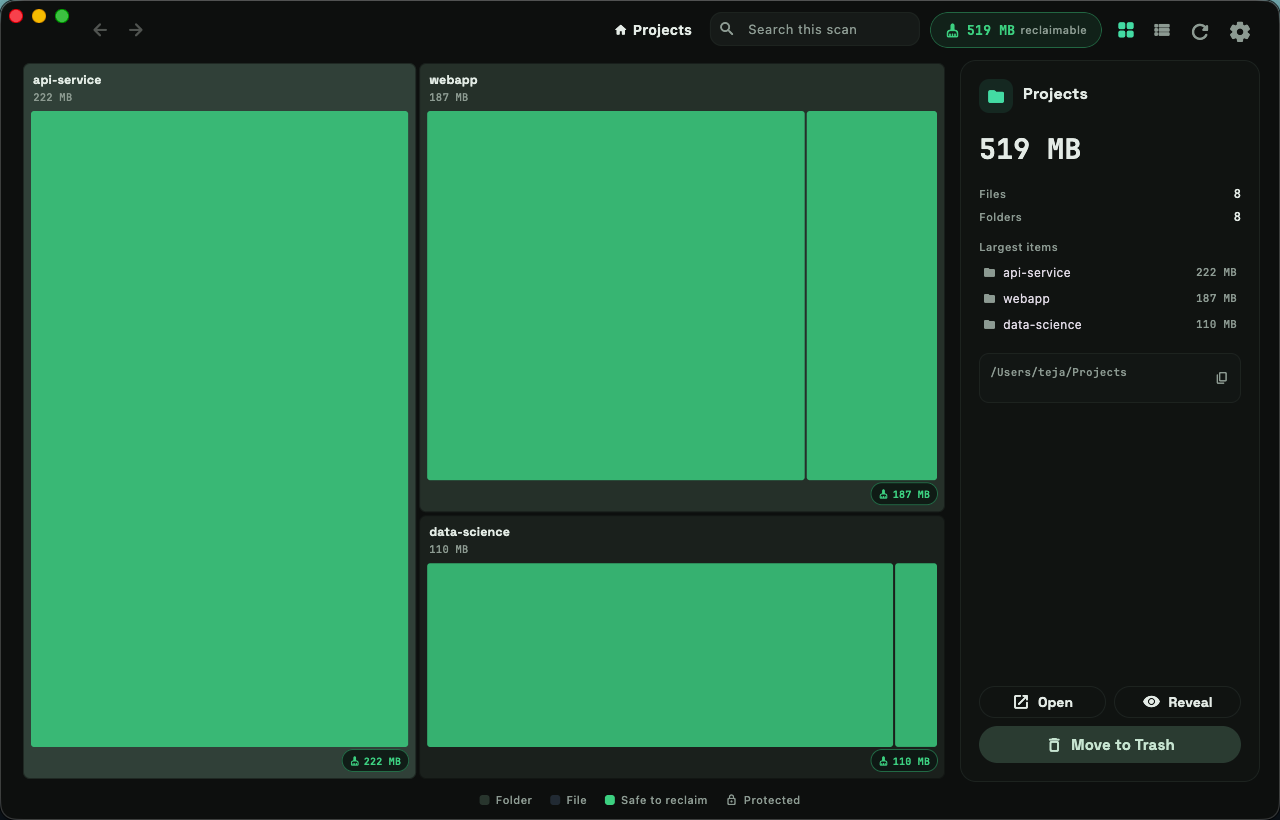
fig. 01 — sample scan of a projects folder 519 MB safe to reclaim ·  protected

Clean Mind v1.2.1 Apache-2.0 macOS / Linux / Windows no telemetry

§01

The problem

Storage fills up quietly — and the agentic-coding era made it worse. A few weeks of leaning on coding agents, and the disk-full warning arrives. You didn't download anything big. You'd just been building. Every cleaner shows you where the space went, then leaves you to guess whether deleting a folder will wreck a project. Clean Mind actually understands your disk.

§02

The method

fig. 02 — performed below

fig. 02a — SCAN

Walk the disk.

A parallel Rust scanner walks any folder — or drag one in. Sizes are true on-disk sizes: hardlink-aware, APFS-clone-aware. A full home directory — about 1.2 million files — scans in ~8 seconds.

fig. 02b — UNDERSTAND

See where it went.

The scan becomes a treemap you can read — every tile sized by the space it takes. Drill down with breadcrumbs, switch to a sortable list, or search the entire scan.

fig. 02c — CLASSIFY

Mark what's safe.

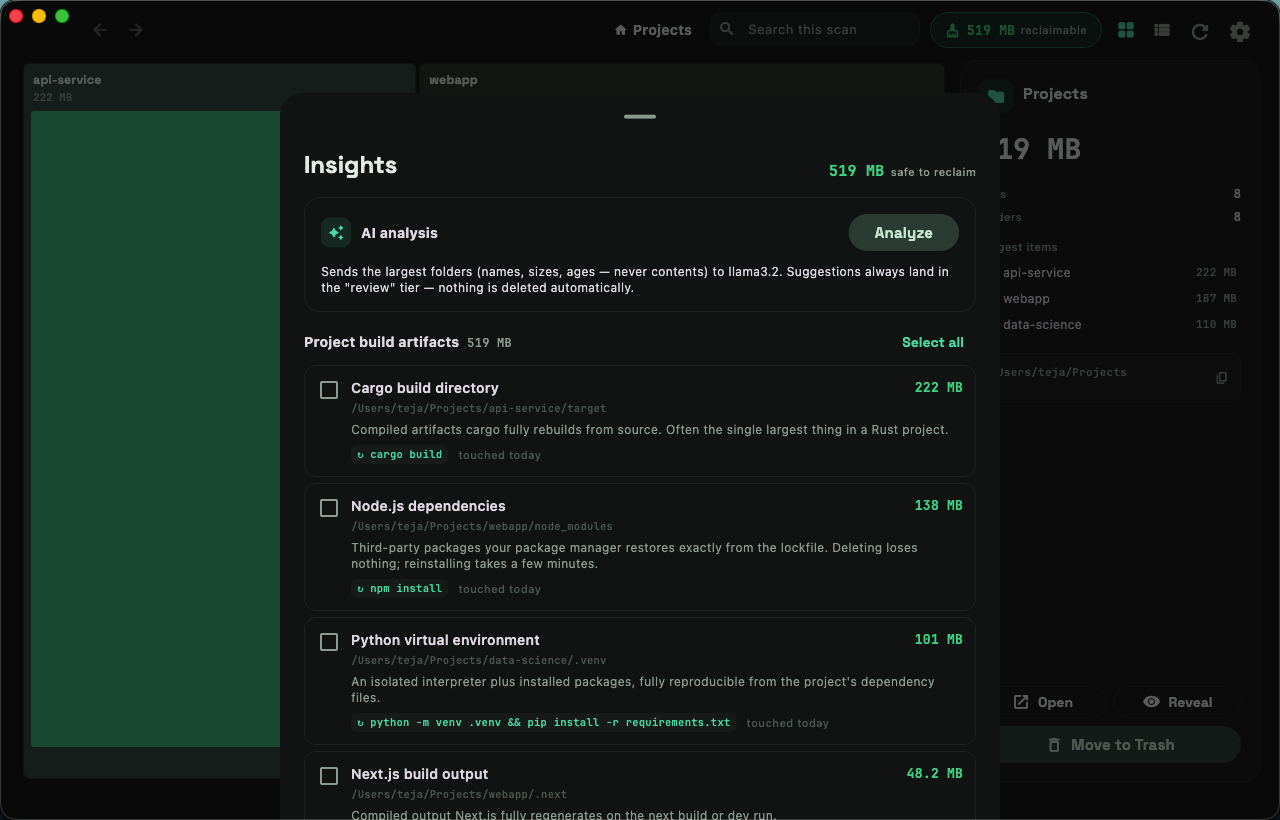
A deterministic rules engine recognizes developer artifacts — node_modules beside a package.json, cargo target/, DerivedData — and records how each one regenerates. The rules engine, not the AI, is the source of truth.

fig. 02d — CLEAN

Reclaim to the Trash.

One click sends verified-safe items to the OS Trash — recoverable, never automatic. Permanent deletion sits behind a type-to-confirm gate.

§03

The trust model

Everything the scan finds lands in one of three tiers. The AI is never trusted on its own.

T1

Safe · regenerable

Confirmed by the rules engine — like node_modules next to a package.json. Fully reproducible, rebuild command included.

one click → Trash
T2

Review

AI suggestions that no rule verifies. Always shown with reasoning — never one-click, never deleted automatically.

human confirms each item
T3

Protected

A hard-coded denylist — documents, photos, .ssh, system paths — that neither the rules nor the AI can override.

never selectable
§04

Privacy

Private by design, not by policy.

Everything runs on your machine. The optional AI pass is the only thing that can leave it — and it's built so it can't leak your files. With pseudonymization on, it never even learns your folder names:

on your machinewhat the AI sees
~/Projects/wedding-sitedir-1
~/Projects/wedding-site/node_modulesdir-1/node_modules
~/Documents/taxes-2025dir-2

Structural names like node_modules stay readable. Mapping answers back to real paths happens locally.

4.1

Offline by default

No telemetry, no account, no background service. Scan results live only in memory — fresh every launch.

4.2

AI on your terms

Strictly opt-in. Bring your own Anthropic or OpenAI-compatible key, or run a local model with Ollama.

4.3

Metadata only

The AI sees directory names, sizes and ages — never file contents.

4.4

Keys in the keychain

API keys are stored in the OS keychain, not in config files.

§05

Plates

plate I — scan → treemap → insights → Trash, in motion.
Clean Mind's treemap view: folders rendered as tiles sized by disk usage, with build artifacts highlighted in green as safe to reclaim, and a detail panel summarizing the selection.
plate II — the semantic treemap: green tiles are rules-verified safe.
Clean Mind's insights panel: reclaimable items such as a Cargo build directory and Node.js dependencies, each with an explanation of why it is safe and the command that regenerates it.
plate III — why each item is safe, and the command that brings it back.
§06

In one line

The DaisyDisk idea — free, cross-platform, and it actually understands a developer's disk.

§07

Download & install

v1.2.1 · free · Apache-2.0

One native app on macOS, Linux and Windows — x64 and arm64, each with the right OS conventions (Trash vs Recycle Bin, per-platform volumes, long paths on Windows).

macOS

12+ · universal · Apple silicon & Intel

recommended — homebrew

brew install --cask MS-Teja/clean-mind/clean-mind

or the DMG: CleanMind-1.2.1-macos.dmg

Not notarized — first launch on macOS 15+: open once, then System Settings → Privacy & Security → Open Anyway (earlier versions: right-click → Open). Grant Full Disk Access for complete results.

Windows

10 & 11 · x64 & arm64

recommended — scoop

scoop bucket add clean-mind https://github.com/MS-Teja/scoop-clean-mind scoop install clean-mind

or portable zips: x64 (Intel/AMD) · arm64 (Snapdragon X)

Extract and run clean_mind.exe. If SmartScreen warns: More info → Run anyway.

Linux

GTK 3 · amd64 & arm64

recommended — one-line installer

curl -fsSL https://ms-teja.github.io/clean-mind/install.sh | sh

Picks the right build for your CPU: the .deb on Debian/Ubuntu/Kali/Mint, a per-user install elsewhere (no root).

or the .deb: amd64 · arm64 — then sudo apt install ./<file>.deb

or the tarball + install.sh (user-level, no root): x64 · arm64

every build + checksums: github.com/MS-Teja/clean-mind/releases